Objective
outcome

Problem & motivation:
Information Gathering & User Research:
Ideation, Scenarios & Early Prototyping


A Design Shift That Changed Everything…
At first, we leaned heavily on UI canvases to explain things - checklists, maps, buttons, panels, popups.
But the more we tested, the more wrong it felt.
Floating UI panels made the experience feel:
Too scripted
Too “game-like”
Detached from real emergency behavior
That’s when we made a major design decision:
If this wouldn’t happen in real life, it probably doesn’t belong in the experience.
We started replacing text with:
Directional voice cues
Environmental signals
Character behavior and animation
This shift heavily influenced how every scenario evolved.
Scenario 1 - Preparation & Team Awareness


The first scenario takes place in a virtual office, where journalists prepare before heading into the hurricane zone.
The original idea included: A virtual office, A checklist, A 3D map, Multiple other tasks
But user feedback and testing showed these slowed pacing and felt unnecessary. So, I simplified the scenario to focus on only what actually mattered:
Knowing who your teammates are
Selecting critical equipment needed for the field
Realistic Office Environment
Automatic Scene switch
Key Interactions I Built in this scenario
Grab-based object selection
Players pick up tools like a satellite phone, first-aid kit, or umbrella from a table.
These objects later reappear in future scenarios, reinforcing continuity.
I removed teleportation and implemented continuous movement to keep behavior smooth and consistent across all scenes.
continuous locomotion
Gaze-based teammate info
When the player looks at a teammate, a small UI appears with their role and experience - just enough information, without breaking immersion.
Team-following mechanic
I integrated a pathfinding script so teammates follow the player naturally, switching between idle and running animations.
Scenario 2 - Entering the Chaotic Environment


This scenario places users directly into a storm-affected street environment.
Environmental Storytelling:
Swaying power poles with electrical sparks, paired with buzzing spatial audio
Panicked NPCs, animated individually with layered screaming audio
Carefully staged movement paths ensured users always hear or see chaos, no matter where they went
Map & Flow Design


The challenge here was balancing freedom vs. guidance without a fully open world. So we Replanned the map routes to:
Start at a road intersection with false branching paths
Use environmental hazards (fallen poles, gas leaks, blocked streets) to redirect users organically
Funnel users toward a central medical rescue scene, then onward to reporting and evacuation
We also mapped the hurricane’s movement direction so:
The storm visually approaches from the coastline
Users instinctively move away from danger, aligning gameplay with real-world logic
Key Challenge
We struggled with how users should decide where to take shelter.
UI-based solutions (eye-tracking panels, mini building models) broke immersion.
Due to time constraints, we simplified this into one discoverable safe building, using environmental cues instead of explicit choices.
Scenario 3 - Hazards & Team Communication


This scenario focuses on situational awareness and urgency.
Key Interactions:
Immersive audio & visual cues
external
emergency
ray + grab interactions
One of the biggest challenges in this scenario was that many real-world tools rely heavily on screens and text-based instructions, which tend to break immersion in VR. Instead of overlaying digital UI panels, I shifted toward more natural guidance methods.
I used blinking animations to highlight urgency, layered spatial audio cues to direct attention and environmental storytelling to communicate context. Rather than explicitly telling users what to do, I designed the experience to subtly draw their attention toward the right action, allowing decisions to feel intuitive and grounded in the environment.
Scenario 4 - Medical Emergency & Ethical Reporting


This scenario went through several iterations.
Originally, we explored - Asking permission before filming & Hypothermia treatment
After discussions with the clients, we realized:
We didn’t have the medical expertise to design accurate first-aid training
Some interactions added complexity without strengthening learning goals
To keep the experience focused and realistic, we:
Removed the filming-strangers interaction
Shifted all interactions outdoors to maintain environmental continuity
Reframed the medical emergency around an injured teammate instead of a stranger
Scenario 5 - Live Reporting & Evacuation

Goal: Train journalists to deliver a live report under pressure, secure the data and then evacuate responsibly.
This scenario is where everything comes together.
Key Interactions:
Grab microphone and umbrella
Cameraman animations guide the flow without text
Live reporting setup
(one of my proudest contributions):
Cameraman waves to attract attention
Points to camera → start reporting
Signals evacuation
Packs camera into bag
Waits for the players decision
Complex animation sequence
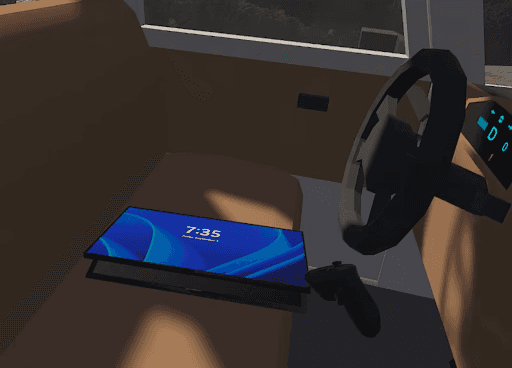
Evacuation & data safety
Open car
Grab tablet
Use ray interaction to upload files before leaving
All of this happens without text, guided purely by animation and spatial audio.
Audio as the Primary Guide
Across the entire project, audio became our strongest UX tool.
Instead of instructions/UI panels we added:
Ambient sounds (wind, rain, glass breaking) trigger on scene load
Directional voice cues subtly guide movement:
“Come here, on your right”
“We should leave, let’s go to another street”
“Looks dangerous, check the other street”
Each cue is triggered using carefully placed box colliders, ensuring audio feels reactive rather than scripted.
Challenges & How We Handled Them
Making It Feel Real
Balancing Freedom & Control
Tight Deadlines
What I Took Away From This Project
This project completely changed how I think about XR design.
I learned that:
Immersion without clarity is meaningless
Audio is incredibly powerful in VR
Subtle guidance feels more realistic than explicit instruction
Most importantly, I’m proud that the final experience feels like a real hurricane emergency—where danger, urgency, and responsibility coexist, and where every interaction supports the learning goal.


